
TL;DR
Capture your foot measurements and intended use, generate an adjustable Ergono3D STL, select a compatible TPU, slice the file, and print it on an FDM machine. Remove the brim, smooth the edges, add a top cover if needed, then wear-test the insole in the shoe it was designed for.
Need a printable file? Start with the STL generator. Comparing adjustable design options or clinic workflows? See the insole design software page. Calibrating material, slicer settings, or your printer? Use the TPU printing guide.
Key takeaways
- Follow the full path. Measure and profile the foot, design the STL, choose and slice TPU, print, finish, then fit-check in the target shoe.
- Calibrate, don't copy blindly. The TPU values below are a documented starting profile; filament brand, printer, geometry, walls, and infill can change the result.
- Use the focused page for each focused job. Create the file with the STL generator, evaluate the broader product workflow on the insole design software page, and calibrate material and slicer settings with the TPU printing guide.
- Finish and fit-check. Trim the brim, round the edges, add a top cover if needed, and test the insole in the shoe for which it was designed.
- Change one variable at a time. Keep the STL editable, record wear feedback, and adjust either a design parameter or a print setting before the next version.
This is the end-to-end guide for anyone asking how to 3D print an insole, from fit inputs to the first wearable test. Ergono3D converts a guided foot profile into an adjustable STL; it does not import or require a 3D foot scan. You still need a compatible FDM printer, a suitable flexible filament, and your own calibration and fit checks.
The biggest misconception about "custom insoles" is that they must be hard to make — hand-carved by a specialist, formed from plaster casts, pressed in a clinic, and sent to a lab. To be fair, that's still the reality of the traditional process in many places.
A typical pair of traditional custom insoles goes through:
- Visit a clinic for a foot assessment
- Capture foot shape using plaster, foam box, or a professional scanner
- Send data to a lab
- Technician creates the mold by CNC or by hand, adds top cover and finishing
- Wait several days — or one to two weeks — to receive the final product
This process combines clinical assessment, technician work, equipment, fabrication, and fitting. Price, turnaround, and revision steps vary by provider, location, case, and what the service includes.
For a DIY design-and-print project, the practical path has five checkpoints:
Keep the roles clear: use the STL generator when you only need a printable file, the design software overview when you are evaluating adjustable parameters and clinic workflows, and the TPU printing guide for material calibration and detailed slicer troubleshooting. Stay on this page for the complete DIY sequence that connects those steps.
Four real wearers — and what they tweak.
Custom 3D printed insoles aren't a single product — they shape themselves to the foot underneath. Here's what the first few iterations look like for four common wearer profiles.
The 10K runner with high-arched feet
Often surfaces as plantar fasciitis-style heel pain after long runs. High arches transfer ground impact to the heel and forefoot instead of distributing it across the midfoot.
Illustrative tweak → Compare a firmer TPU test print, arch contact, and heel-cup depth one variable at a time; do not infer a prescription from the profile label.
Activity-specific design →The nurse on a 12-hour shift
Long-shift workers feel arch fatigue and forefoot burn first. Standing insoles need cushioning and even pressure distribution, not athletic-style rigidity.
DIY tweak → TPU 85A · met pad: Yes · moderate arch height. Iterate forefoot padding until end-of-shift heat goes away.
Why custom insoles work →The court-sports player who rolls inward
Lateral wear on the shoe sole; ankles roll inward on landings. Without lateral support, this load travels up the chain to knees and hips.
DIY tweak → TPU 95A · add medial heel skive · add rearfoot varus post · raise lateral flange.
Court sports insole design →The office worker with flat feet
Wants all-day comfort, not athletic performance. Flat arches often pair with lower-back tightness and inner-ankle fatigue by mid-afternoon.
DIY tweak → TPU 90A (balanced) · raise arch height · raise medial flange · longer arch length ratio.
Parameter glossary →What you'll need before you 3D print an insole.
- Foot length, shoe size, fit profile, and target shoe — use the free measure tool if needed; no 3D scanner is required
- A home FDM 3D printer capable of printing TPU
- TPU filament supported by your printer and hotend
- Slicer software — Bambu Studio / OrcaSlicer / Cura (any one)
- An Ergono3D-generated STL file
Capture the fit inputs and generate an adjustable STL.
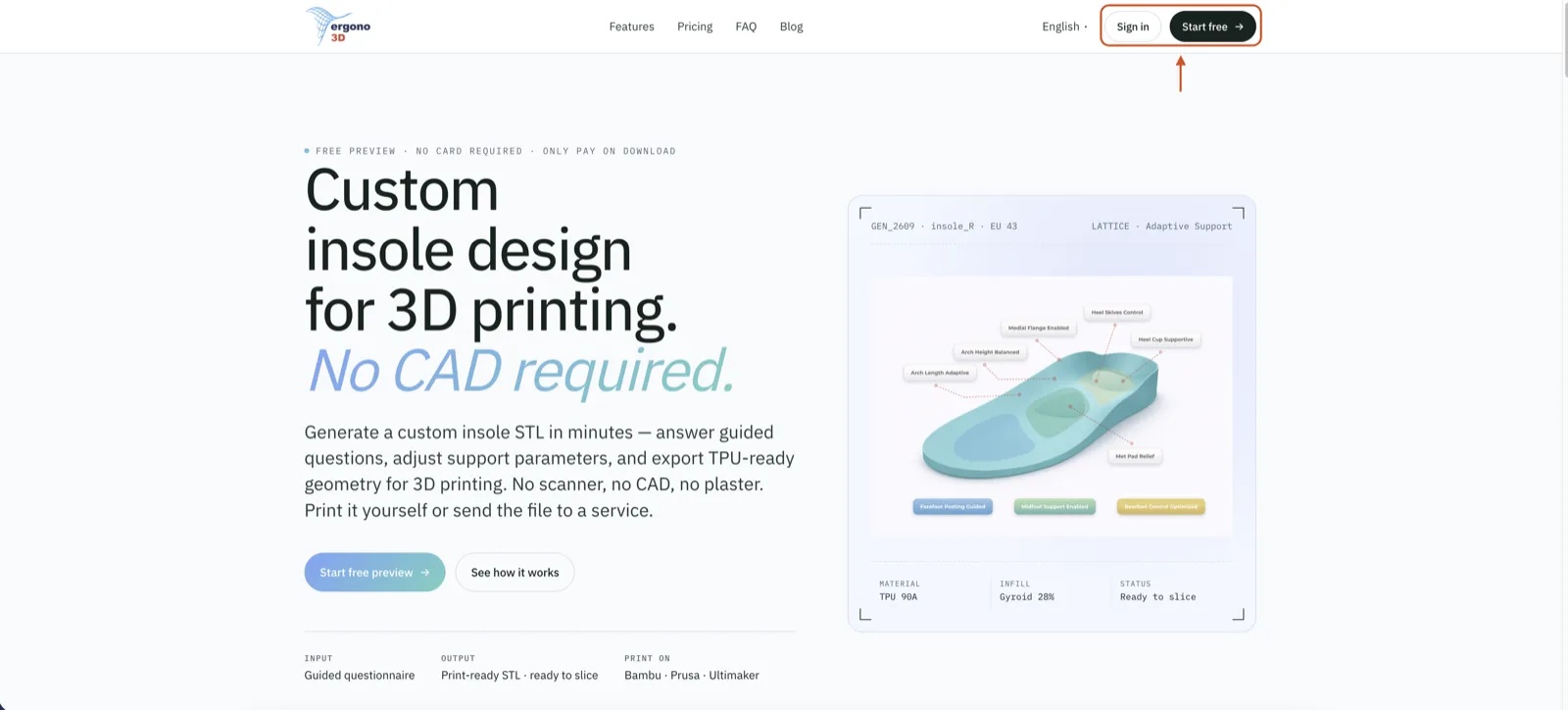
Open the custom insole STL generator and click Sign up in the top-right corner.
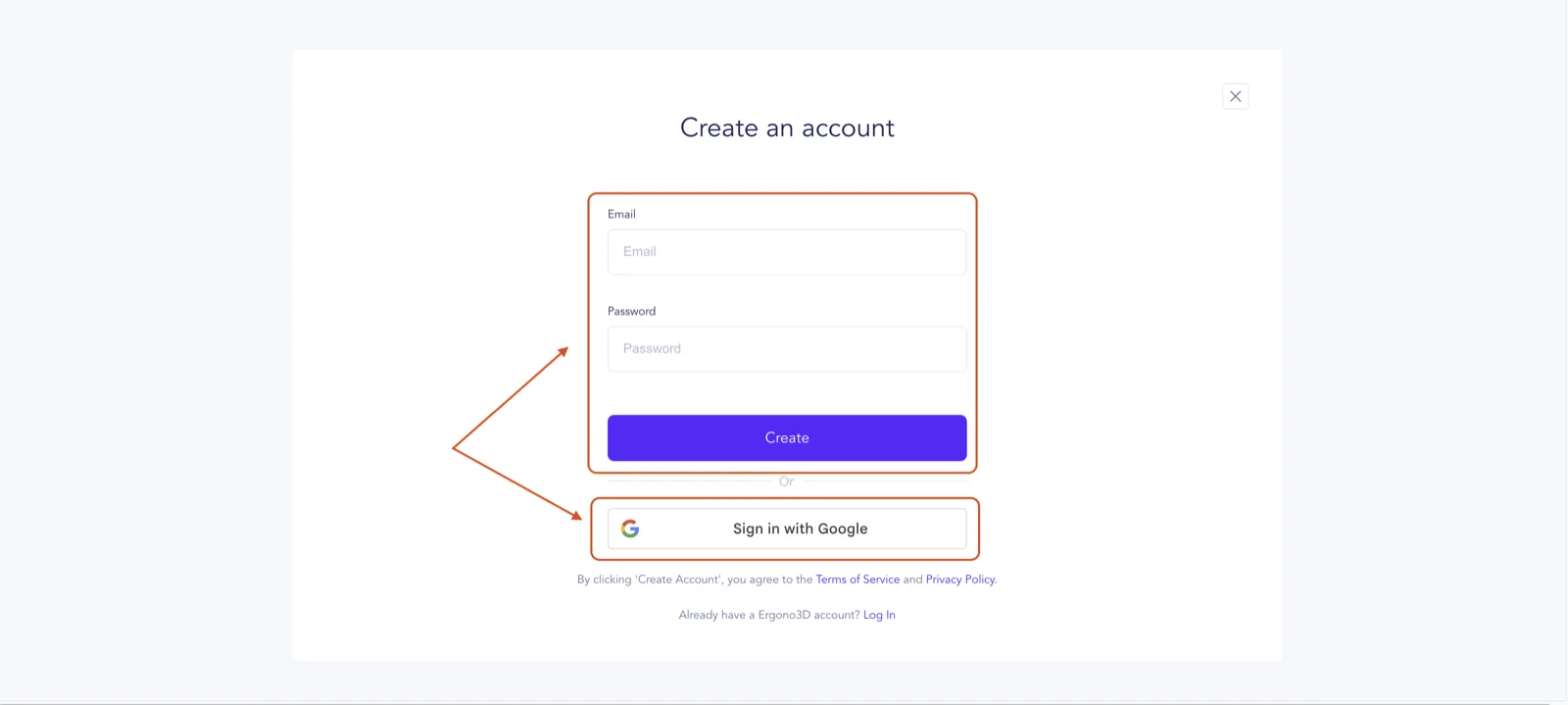
You can register directly with email and password, or continue with your Google account.
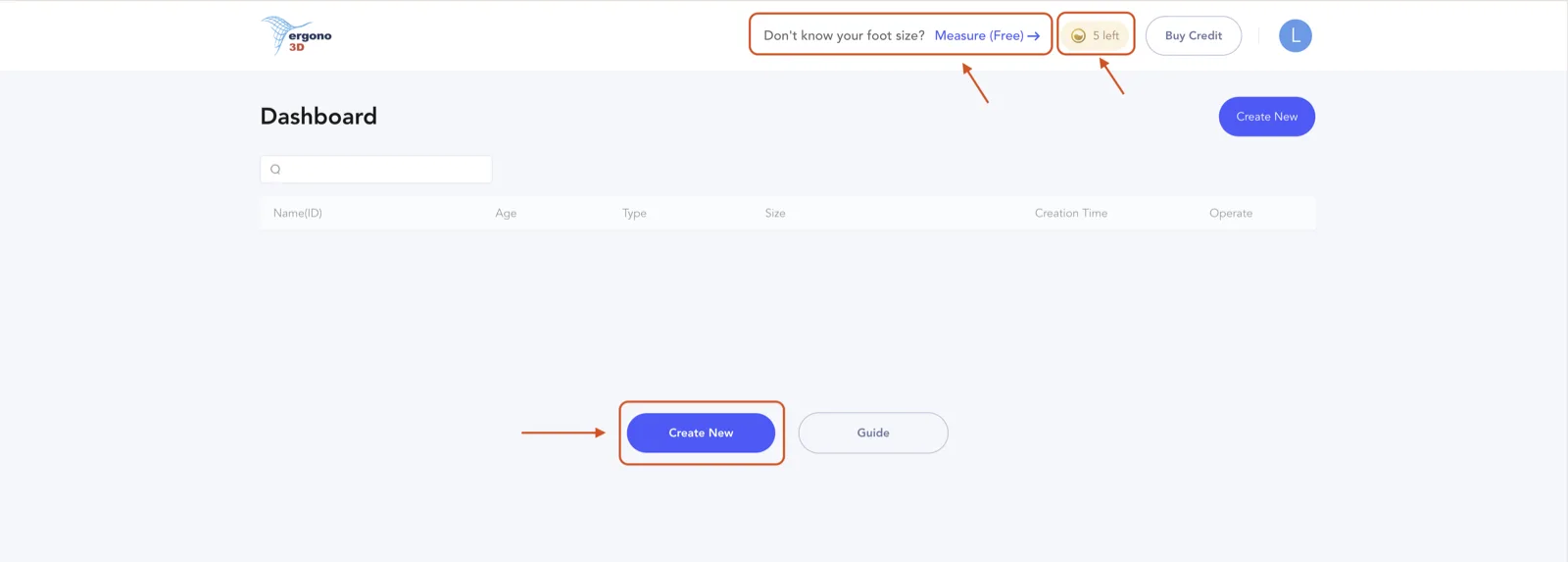
Every new account gets 5 free Preview credits. Click Create New to start a design. If you're not sure of your shoe size, use the free foot measure tool linked from the dashboard — open ergono3d.com/measure, pick A4 or US Letter, step onto the sheet, and trace your foot outline from toe to heel with a dark pen.
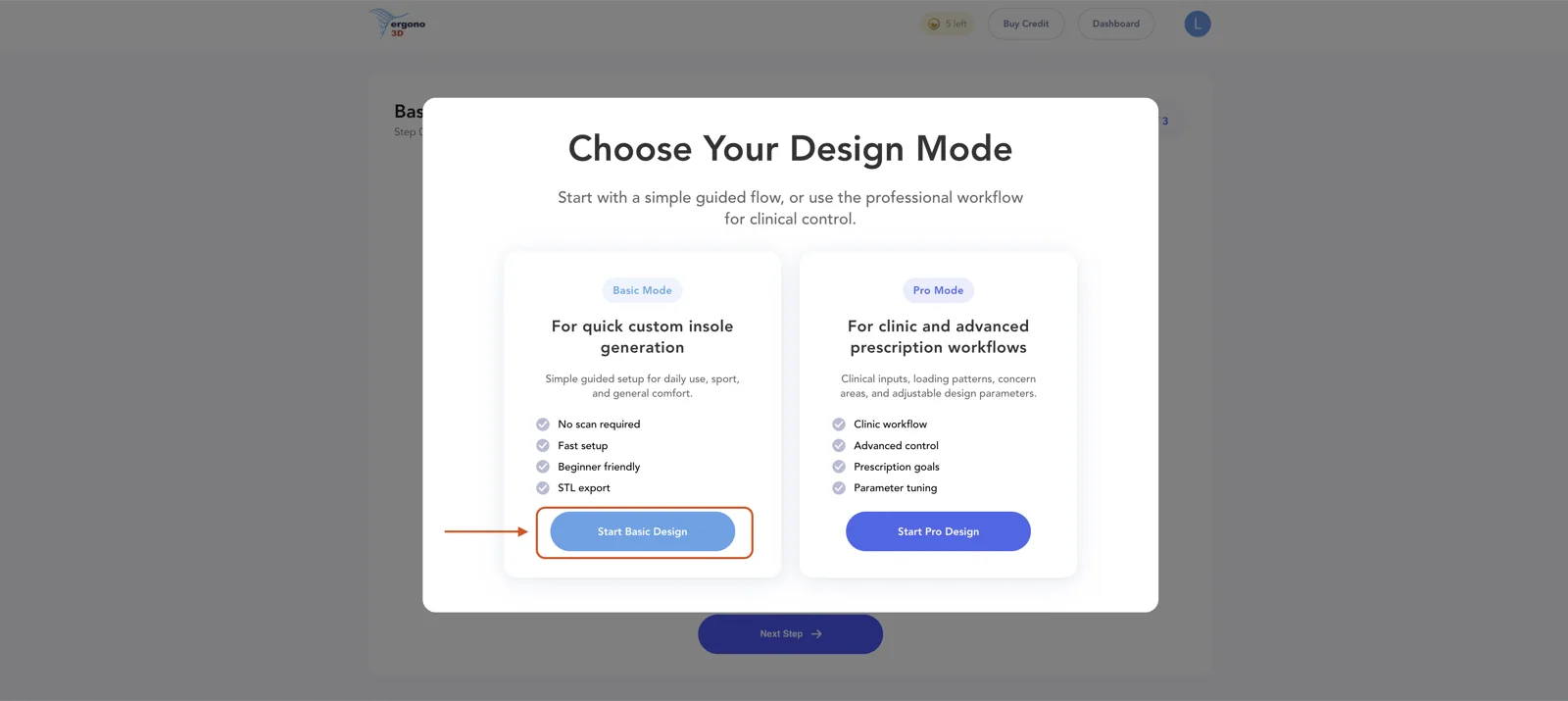
Pick a design mode. For your first pair, choose Basic design — it walks you through a guided survey and produces a print-ready STL.
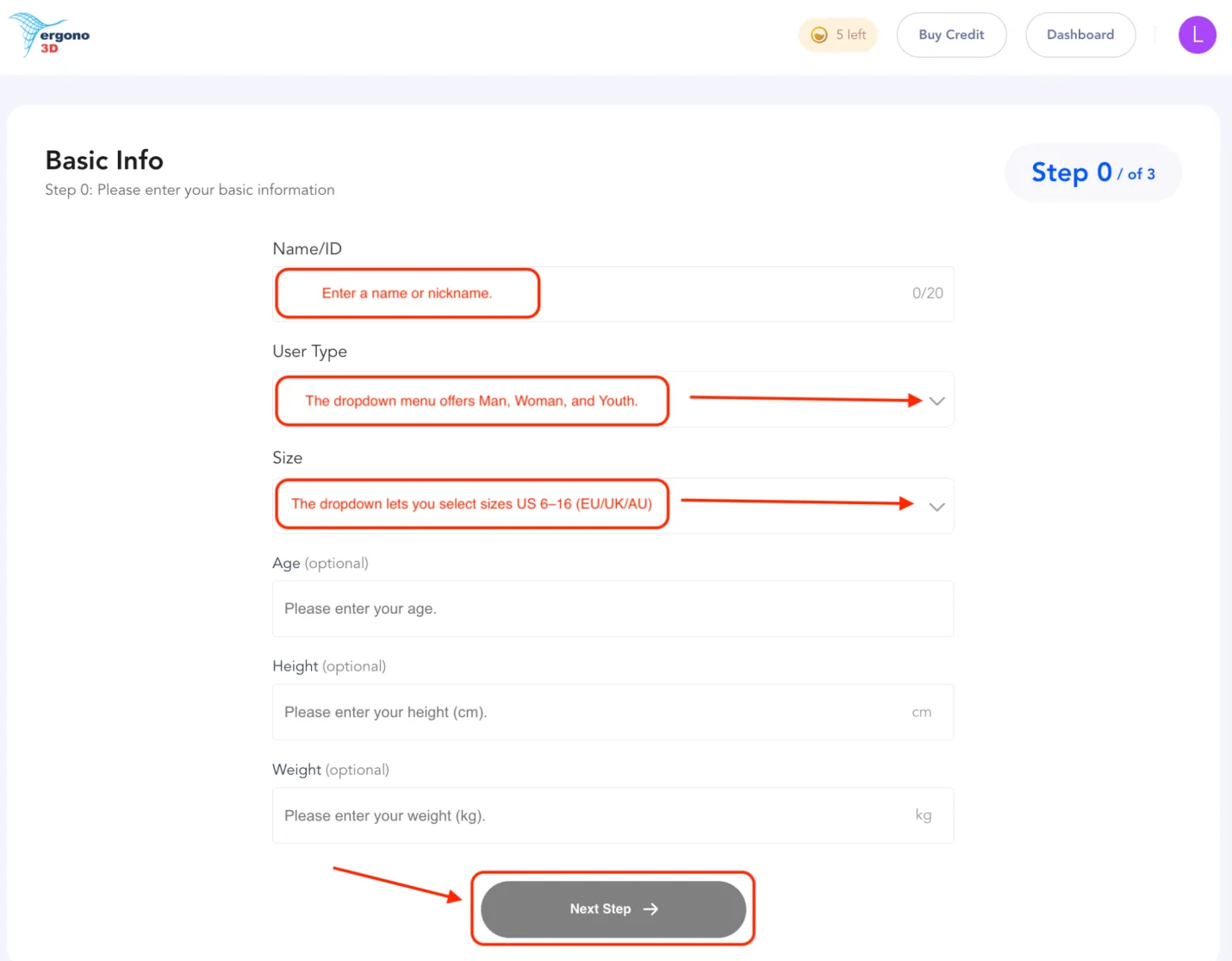
Enter a Name or ID for this pair — a nickname or a number both work. Choose User Type (Men / Women / Youth) and Size (EU / UK / AU — covering US 6–16). Age, height, and weight are optional but help refine the fit. Click Next.
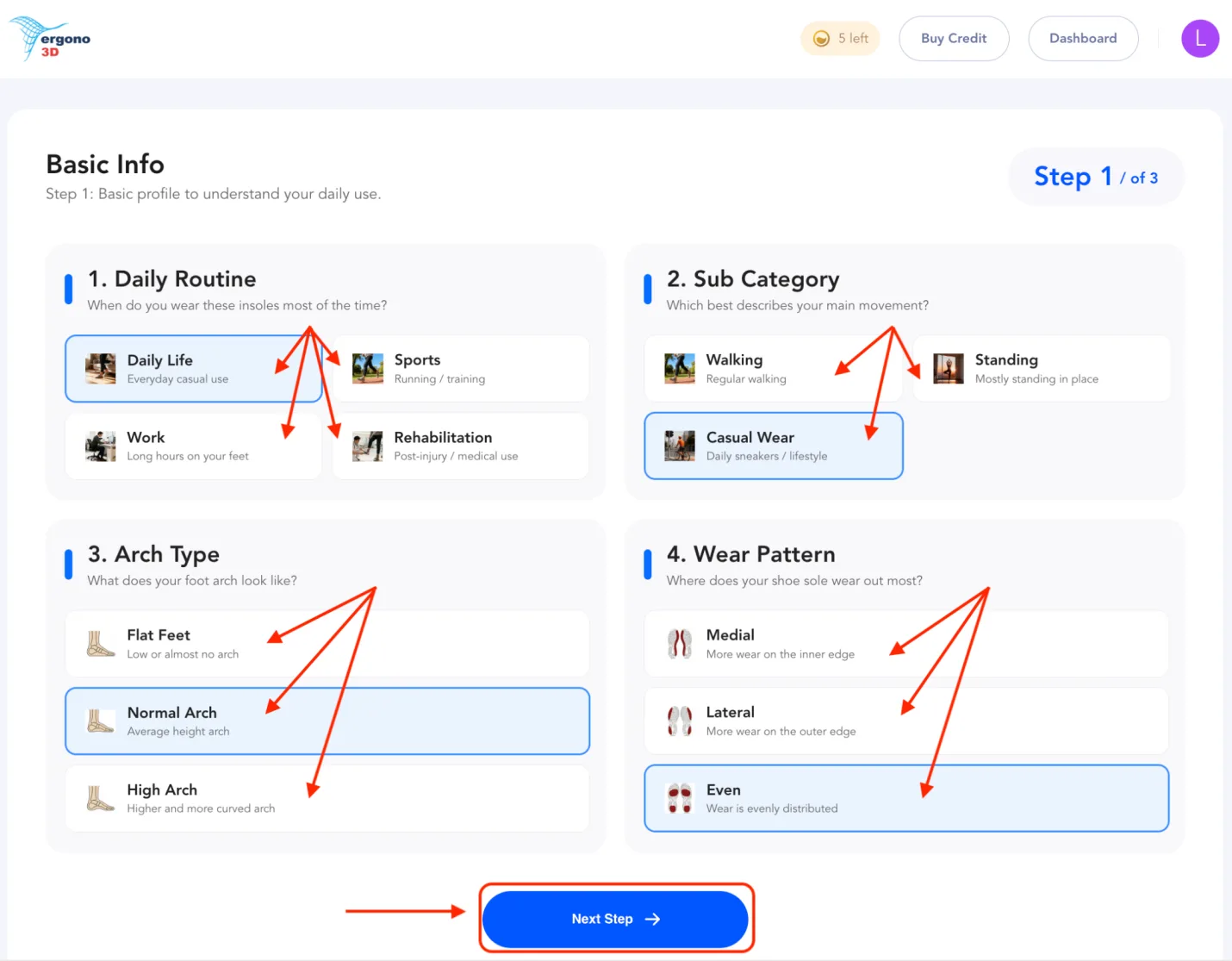
Pick your daily routine (daily life / sports / work / rehabilitation) and a sub-category (walking / standing / casual wear). Select your arch type (flat feet / normal arch / high arch) and the wear pattern on your existing shoe soles — medial, lateral, or even. Click Next.
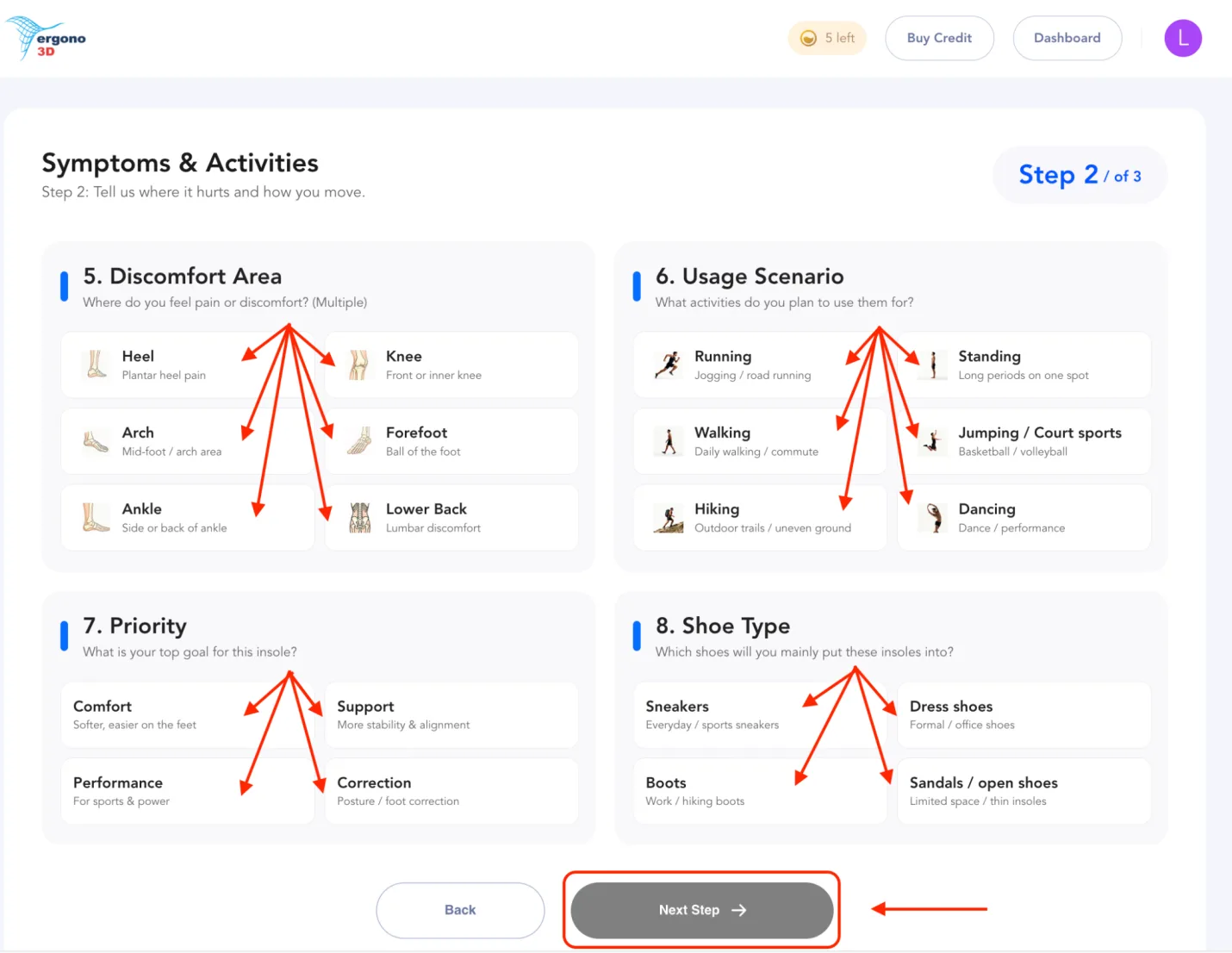
Multi-select your discomfort areas (heel / knee / arch / forefoot / ankle / lower back). Set the priority for this pair (comfort / support / performance / correction). Pick the usage scenarios you'll wear them for (running / standing / walking / court sports / hiking / dancing) and the shoe type you'll put them into (sneakers / dress shoes / boots / open shoes). Click Next.
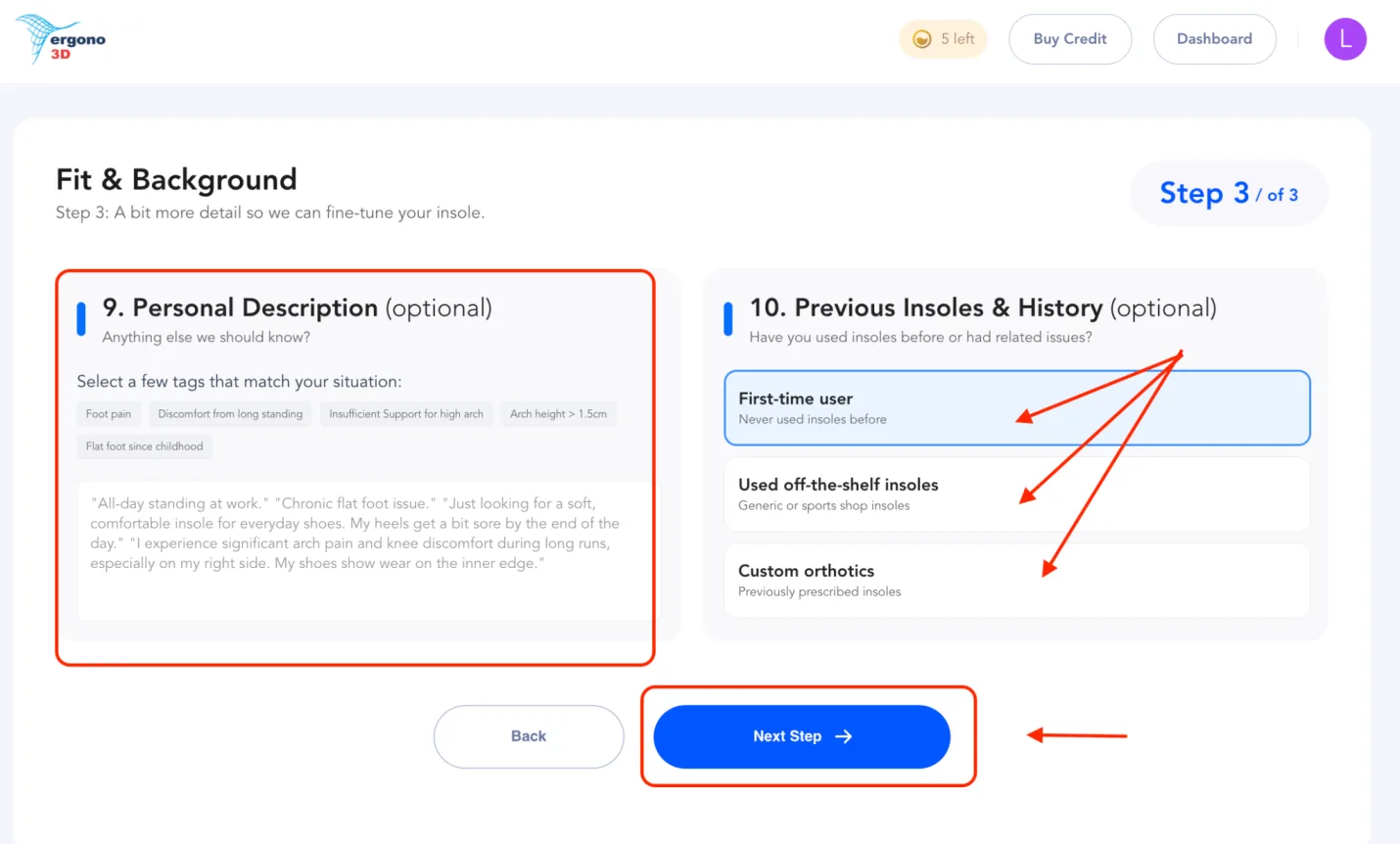
Optionally add a personal description — anything we should know that the earlier questions didn't cover. Then tell us about your insole history: first-time user, used off-the-shelf insoles, or used custom orthotics before. Click Next.
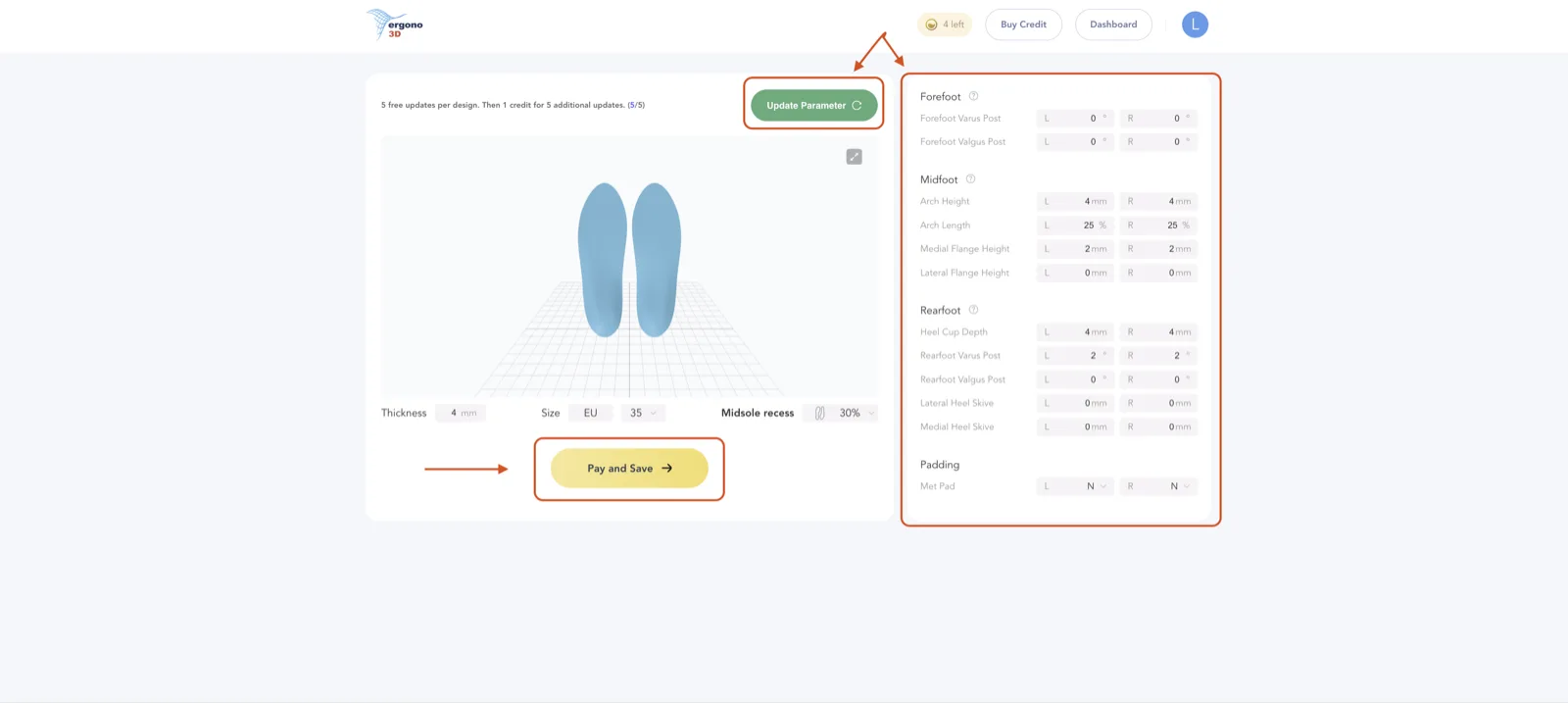
Your fully personalised insole STL is ready. On this screen you can:
- Download & save the STL (bottom-left of the screen) — pay with your remaining credits, then save the file to your computer.
- Tweak advanced parameters in the right panel — fine control over forefoot posting, arch geometry, heel cup, skives, and metatarsal pad. Full list below.
- Update parameters — after any tweak, click Update parameters to regenerate. You can also change overall thickness, midsole recess, and re-select size on this same screen.
After you save & pay, the file lands in your dashboard. You're not locked in — every saved insole stays editable, so you can keep iterating any time from the Operate column.
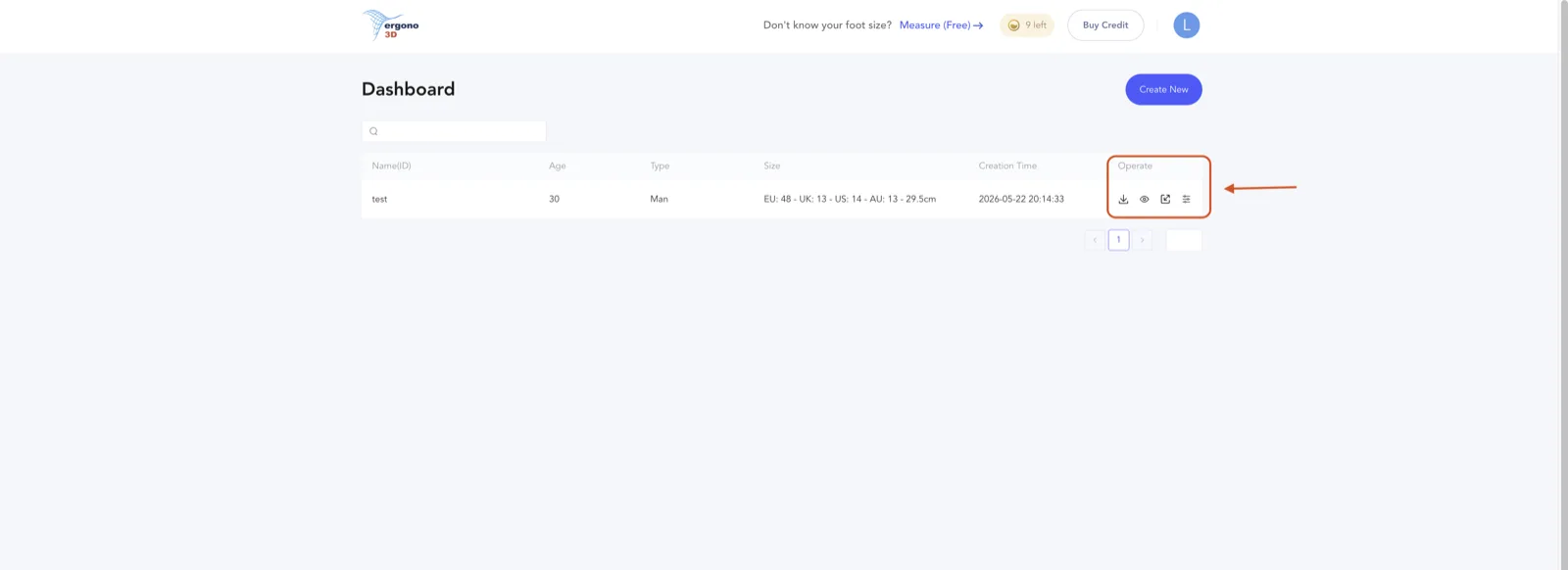
Four icons in the Operate column, left to right:
- Download STL — save the printable file to your computer.
- Online 3D preview — inspect the insole in your browser before printing.
- Scaling adjustment — opens the scaling panel (see below).
- Edit parameters — re-opens the full advanced parameter panel for fine-tuning. The editable fields are exactly the same list shown above.
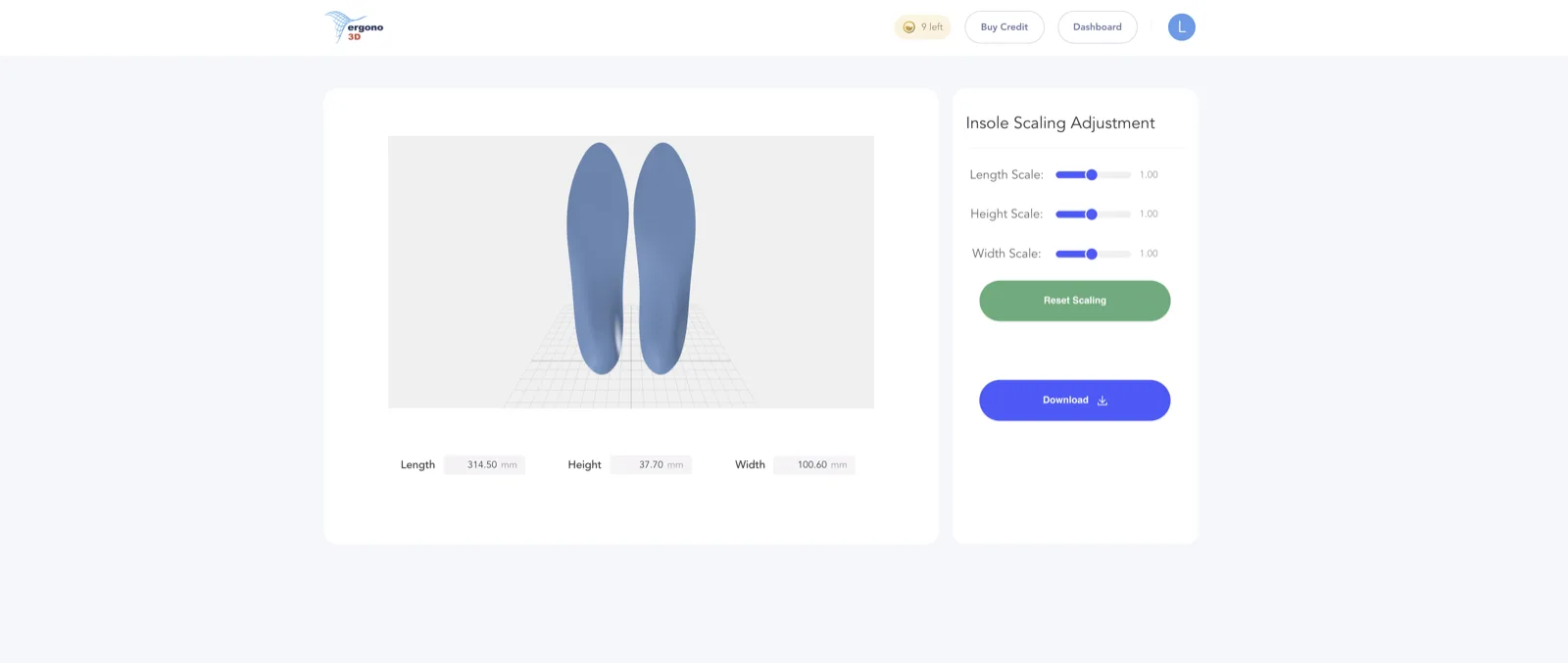
The Insole Scaling Adjustment page lets you fine-tune the overall dimensions with three sliders — Length Scale, Width Scale, and Height Scale. The 3D preview updates in real time, and you can download the rescaled STL directly from this screen. If a downloaded file needs local widening or a shorter outline, use the free browser tool to resize or trim the insole STL before slicing.
Once the file is downloaded and you're happy with it, move to the next step.
Configure your TPU insole print settings.
After importing the STL into your slicer, use this beginner-friendly, reliable baseline profile for TPU 95A. For the deeper print workflow, see the full TPU insole printing guide.
| Setting | Recommended value |
|---|---|
| nozzle_temp | 235°C (range: 220–250°C) |
| bed_temp | 55°C (range: 45–60°C) |
| max_volumetric_speed | 3.2 mm³/s |
| print_speed | 25–50 mm/s |
| infill_pattern | Gyroid |
| infill_density | 20% |
| retraction | 0 mm (OFF) |
| cooling_fan | 100% max |
For TPU 85A and 90A settings, see the full print settings table on the Pricing page → — or read the deeper TPU material guide.
Click print.
Two things to watch during the print:
- Make sure the first layer sticks to the build plate. If it doesn't, stop and restart — a failed first layer means a failed print.
- If you see severe warping mid-print, stop immediately. Continuing will almost certainly ruin the part.
In most cases, a pair of insoles will finish after a few hours depending on printer speed and infill density.
Finishing after the print.
- Remove the insoles and trim off the brim (if any) with scissors.
- Use small scissors or sandpaper to gently round the edges — especially around the heel where sharp edges can rub.
- Add a top cover layer — EVA foam, Poron, or fabric — for comfort, sweat management, and friction control.
Choosing a top cover by activity: Poron for impact absorption (running, basketball, court sports); EVA foam for all-day comfort (standing all day, walking, office wear); perforated leather or fabric for dress shoes (low bulk, breathable). If your feet are sensitive (e.g. flat feet, plantar fasciitis-style pressure), you may find thicker Poron more comfortable than thin fabric.
Wear test feedback. Optional, but highly recommended.
If you want the next version to feel better, three notes are enough:
- Where it feels too high or rubs: forefoot / inner arch / outer arch / heel edge
- Support feel: too stiff / too soft / just right
- Where fatigue or hotspots appear first: heel soreness / arch fatigue / tight calves / knee discomfort / friction points inside the shoe
Feedback → next-iteration tweak. This table is the practical bridge between "how it felt" and "what to change before reprinting":
| What you feel | Zone | Next-iteration tweak |
|---|---|---|
| Heel hotspot or friction | Rearfoot | Reduce heel cup depth |
| Plantar fasciitis-style heel pain | Rearfoot | Increase heel cup depth · soften to TPU 85A |
| Arch fatigue after long standing | Midfoot | Increase arch height |
| Arch feels too high / sharp pressure | Midfoot | Reduce arch height |
| Forefoot burn during running | Forefoot | Met pad: Yes · raise top cover thickness |
| Insole sliding inside shoe | Global | Reduce overall thickness or midsole recess |
| Ankle rolls inward (overpronation) | Rearfoot | Add medial heel skive · add varus post |
| Knee or shin discomfort developing | Rearfoot | Check rearfoot post angle — may be too aggressive |
| Shell feels too stiff overall | Material | Next print: TPU 85A or 90A · lower infill density |
| Shell feels too soft / collapses | Material | Next print: TPU 95A · raise infill density |
Each parameter is explained in detail in the Insole Design Parameters guide →
Quick fixes. 90% of failures happen here.
- WARPING · LIFTING OFF BED Increase the brim. Raise bed temp slightly. Use a glue stick or painter's tape on the build plate.
- STRINGING TPU is moisture-sensitive. Temperature may be too high. Retraction may not be ideal. Dry the filament first — this solves the majority of stringing cases.
- BUBBLES · HOLES ON SURFACE Filament is wet. Dry it first (65°C in a food dehydrator or oven for 4–6 hours).
- WEAK LAYER BONDING Printing too fast, nozzle temp too low, or cooling fan too high. Slow down, raise temp slightly, reduce fan.
- EDGES RUBBING FEET Round the edges manually. For the next version, choose a geometry with softer edge transitions.
- TOO STIFF Lower infill density. Reduce wall count by one. Choose a softer structure in the next generation.
- TOO SOFT Increase infill density. Add more walls. Choose a more supportive version in the next generation.
- ARCH FEELS TOO HIGH (PLANTAR FASCIITIS PATTERN) Reduce arch height in the next iteration. If your foot is sensitive to arch pressure, also try TPU 85A for a softer compression feel under the arch.
- HEEL SLIPPING INSIDE SHOE The insole is too thick for that shoe. Reduce overall thickness, or increase the midsole recess to lower the heel-sit. Confirm the brim is fully trimmed and edges are rounded.
Try Ergono3D to generate your own custom insole design with parametric control and STL export. Free preview — 5 credits, no card required.
Common questions about 3D printed insoles.
What is the basic workflow to 3D print an insole?
Capture foot measurements and the intended use, generate an adjustable insole STL, choose a compatible TPU and slice the file, print it on an FDM machine, finish the edges, and wear-test it in the target shoe. A 3D scanner is not required for the Ergono3D guided-input workflow.
How long does it take to 3D print a pair of insoles?
Use the slicer's estimate for your printer, model, walls, infill, and speed. With the example 20% gyroid profile in this guide, changing speed from 25 mm/s to 50 mm/s can move the displayed estimate from roughly 5–6 hours toward 2.5–3 hours, before design, setup, failed prints, and finishing. These are configuration examples, not a guaranteed turnaround.
How much does it cost to print a pair of custom insoles?
Calculate print cost from the slicer's material-weight estimate, your current TPU price, failed-print allowance, electricity, and any top cover. Ergono3D design pricing is listed separately on the Pricing page. Do not compare a design-file credit directly with a clinic-made orthotic, which may include assessment, prescription, fitting, and follow-up.
What's the best TPU hardness for insoles — 85A, 90A, or 95A?
There is no universal best hardness. 85A is softer, 95A is firmer, and 90A sits between them, but brand, geometry, walls, infill, body load, shoe volume, and printer settings all change the result. Start with a documented test profile, wear-test cautiously, and change one variable at a time.
→ Deeper material analysis: TPU for Insoles guideAre 3D printed insoles good for plantar fasciitis, flat feet, or high arches?
3D printing makes insole geometry adjustable, but a diagnosis does not determine a safe DIY setting. Do not prescribe arch height, heel-cup depth, or posting from a condition label alone. Seek a clinician's assessment for diagnosed, persistent, severe, numb, or radiating symptoms, then use wear feedback to refine fit within that guidance.
→ Foot biomechanics background: Why Custom Insoles Matter3D printed insoles vs custom orthotics — what's the difference?
Clinical custom orthotics can include assessment, prescription, fabrication, fitting, follow-up, and possible insurance coverage. Ergono3D is a design-file workflow that exports an adjustable STL for separate printing. Price and turnaround vary by provider, location, printer, material, and the services included, so compare itemized scopes rather than headline prices.
→ Full comparison: Beyond the Foam InsertDo I need a special 3D printer to make TPU insoles?
Use an FDM printer whose manufacturer supports the selected TPU and temperature range. The 220–250°C nozzle and 45–60°C bed values in this guide are starting ranges, not compatibility guarantees. Direct-drive extruders are often easier to tune for flexible filament; verify the printer, hotend, build surface, and filament specifications before printing.
How long do 3D printed TPU insoles last?
There is no single supported lifespan. Wear depends on body load, activity, heat, shoe friction, TPU formulation, walls, infill, layer bonding, and cleaning. Inspect the pair regularly and stop using it if you see cracks, permanent deformation, delamination, sharp edges, or a meaningful change in support.
Can I 3D print insoles for running, basketball, or other sports?
Yes — and activity-specific design is one of the biggest advantages of parametric insoles. Running needs forefoot cushioning and heel cup depth. Basketball and court sports need lateral stability (medial heel skive, rearfoot post) for cuts and landings. Hiking prioritises arch support over a longer day. Use the activity field in the Ergono3D survey and iterate based on wear feedback.
→ Activity-specific design: Why One Insole Design Doesn't Fit Every Activity